
Serving the Omaha metro from Bellevue
Computer Repair for Omaha, NE
Affordable Computer Repair handles desktop and laptop repair, gaming PC diagnostics, virus and malware cleanup, data recovery and SSD or RAM upgrades for Omaha-area customers — from our shop a short drive south in Bellevue.
We're an independent shop, not a chain counter. Omaha customers come to us for computer diagnostics and repair, laptop repair, desktop repair, virus and malware removal, data recovery, SSD upgrades, gaming PC repair and Mac repair. You talk to the people who work on the machine, you hear what we actually found, and you get the cost before any repair starts. Omaha metro customers make the drive because the work is reliable.
Bring your computer in, explain what's happening, and talk with us at the counter about the best next step — that conversation is free.
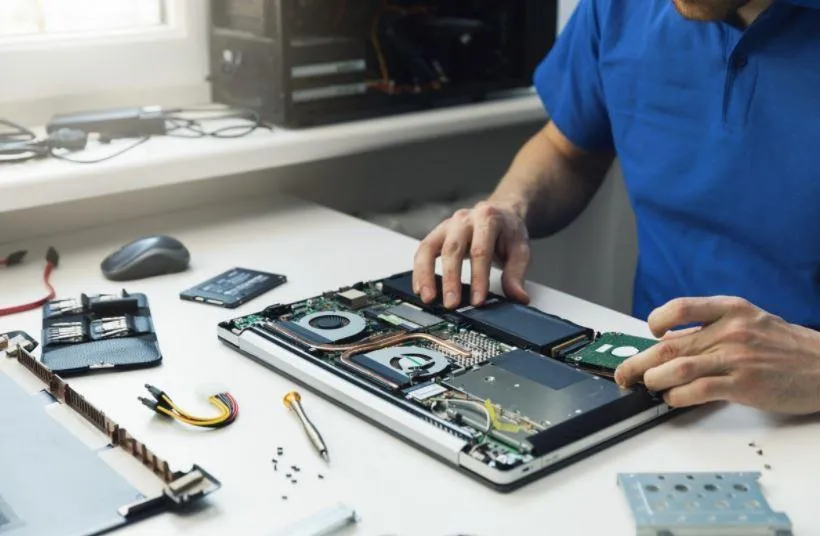
What comes through the door
Computer problems we handle
Most people don't arrive knowing what's wrong — they arrive knowing what the computer is doing. That's enough to start.
- Computer won't turn on
- Windows won't boot
- Computer running slow
- Blue screens
- Random freezes
- Random restarts
- Gaming PC crashing
- Gaming PC won't POST
- Laptop won't charge
- Laptop has no display
- Laptop overheating
- Virus and malware problems
- Fake support scam popups
- Browser redirects
- Deleted files
- Failing hard drive or SSD
- SSD and RAM upgrades
- Mac problems we support
Several of those symptoms overlap. A machine that freezes could be a failing drive, bad memory, a thermal problem or a driver — which is why the first job is finding the cause rather than replacing parts and hoping.
Desktops & Windows
PC and Windows repair
Windows failures look identical from the outside. What separates a quick fix from a failing drive is what happens in the first seconds of startup.
Startup failures, blue screens, freezes and random restarts all get the same treatment: reproduce the fault, read what the machine reports, then test the parts that could produce it. Storage health and memory come first, because those two account for most of what looks like "Windows is broken."
Sometimes it genuinely is software — a failed update, corrupted system files, a driver that no longer matches the hardware. Those are repairable without touching your files in most cases, and we tell you before we do anything that puts data at risk. Slow systems get diagnosed too, since a computer that has always been slow and a computer that recently became slow are two different problems — one is usually a case for an SSD or memory upgrade, the other for a repair.
Start with computer diagnostics and repair or, if it's a tower specifically, desktop repair and optimization.
Laptops
Laptop repair for Omaha customers
Laptops fail in physical ways desktops don't — the charge port takes the weight of the cable, the hinge takes every open and close, and the battery sits inches from the heat.
A laptop that won't charge might be the adapter, the port, the battery or the board, and those are four very different repairs. A black screen might be the panel, the cable, the backlight or the graphics chip. We check the cheap possibilities before the expensive ones and tell you what we found.
We do the physical work many shops send away: screen replacement, DC jack repair, top and bottom case replacement, keyboards and trackpads, batteries and power faults. Overheating and constant fan noise get treated as real faults too — dust, dried thermal paste and blocked vents are common, and so is a background process nobody noticed. If the drive has already failed, we start with data recovery and backup before anything else.
See laptop repair for what the service covers.
Gaming PCs & custom builds
Gaming PC repair
Gaming machines fail under load, which is why they pass every idle test and then crash three minutes into a match.
Crashes during play, shutdowns mid-game, no display after a GPU swap, a build that won't POST, artifacts on screen, thermal throttling — these are the jobs we see most, and they rarely have a single obvious cause. Power delivery, cooling, memory training and driver state all get pushed harder in a gaming system than in an office PC, and the same symptom can come from any of them.
So we test under real load rather than at the desktop. That means reproducing the crash, watching temperatures and power behaviour while it happens, and swapping known-good parts where it's the only honest way to confirm a fault. If you built it yourself and it stopped working after an upgrade, bring the old parts too — it shortens the process, and gamers who've had builds sorted here will tell you it beats guessing at parts.
See gaming PC repair, or upgrades and custom builds if the plan is to improve it rather than only fix it.
Security
Virus, malware and scam cleanup
Not every alarming popup is an infection. Knowing which is which decides whether you need a cleanup or just a closed browser tab.
Fake McAfee and Norton warnings, "Microsoft support" phone numbers on screen, browsers that redirect to sites you didn't ask for, search results that go somewhere else — most of those are web pages and browser extensions rather than malware in the traditional sense. They're still worth removing, and they're still how people end up handing over remote access.
If someone did get remote access — a hacked computer — that's a different conversation. We look at what was installed, what's still running at startup, and what should be changed from a clean device afterwards. We'll tell you plainly if the machine looks clean rather than selling you a cleanup you don't need. Afterwards, Home-IT remote support keeps an eye on the machine afterwards.
Optional next step
Once it's clean, keeping it that way is optional.
Home-IT is our ongoing residential protection, monitoring and remote support option. It's not a fix for an active infection — that's bench work first — but it's there if you'd like a second set of eyes afterwards.
Learn About Home-IT →Files first
Data recovery
When the files matter more than the computer, the order of operations changes.
A drive that clicks, a drive that disappears and comes back, a machine that won't boot but holds years of photos, files deleted by accident — each of those has a different chance of ending well, and continued use is usually what makes it worse. If the data matters, the safest thing is to stop using the computer and bring it in.
We won't promise a recovery or quote a percentage. We look at the drive, explain what we're seeing, and tell you what the realistic options are — including when a case is beyond what any shop should attempt without specialist facilities. Customers who came in for data recovery have written about how clearly the options were explained.
See data recovery.
Performance
SSD, RAM and performance upgrades
On an aging machine, moving from a mechanical hard drive to an SSD is usually the single biggest change available — but only if the drive is what's holding it back.
We check what the system actually supports and where the bottleneck is before recommending parts. An SSD upgrade helps when everything waits on the disk; memory helps when a machine runs out of it; neither helps when the real problem is a failing drive, a thermal issue or software that shouldn't be running at startup.
That's also how the repair-versus-replace conversation goes. Some machines are worth another few years for the cost of a drive and memory — a computer upgrade instead of a new PC. Some aren't, and we'd rather say so than sell parts for a computer that won't repay them.
See computer upgrades or Mac repair if it's an Apple machine.
Home computer help
Printers, email and the everyday things
Not every reason to visit is a broken computer. Plenty of Omaha-area customers come in for the ordinary things that make a home computer frustrating.
- Printer setup and printing problems
- Wi-Fi and network troubleshooting
- Email setup and password recovery
- Webcam, microphone, and sound issues
- New computer setup and file transfer
- General help for home users and seniors
If you'd rather not make the drive for the small things, Home-IT remote support covers residential machines without a trip to the shop.
Why Omaha customers make the drive
A local shop, not a chain counter
Affordable Computer Repair has been repairing computers since 2003, and the bench in Bellevue is where the work actually happens.
You talk to the technician
Explain what the computer is doing to the people who will work on it. No script, no ticket handoff to another city.
Diagnosis before parts
We find the cause first and explain what the repair involves and what it costs before anything starts.
Gaming PC experience
Custom builds, upgrades that stopped working and load-only faults are routine work here, not an exception.
Laptops repaired in-house
Screens, charge ports, cases and hinges — the physical work many shops send away.
Recognised locally
A Best of Bellevue winner and 600+ Google reviews from the surrounding metro.
Community programs
The Single Parent Program and free electronics recycling are part of how the shop operates.
Steven guarantees his work: you have 30 days from the day you pick up your computer to check it over. If the trouble is related to the original reason for service, there is no additional labor charge to make it right.
Customer reviews
What customers say
Reviews from the Google feed for our Bellevue shop.
4.8 average across 600+ Google reviews
“I'm a 69 year old retired Vet who needs to keep an eye on the world still. My vehicle of choice has changed from a plane to a computer. Its arteries got clogged and these surgeons fixed 'em right on up and I'm back to watching again! Great friendly service.”
Before you bring it in
Computer repair help & troubleshooting guides
Written from jobs that come across the bench. Some of these will save you a trip.
- Gaming PC Keeps Crashing: How to Narrow Down the CauseCrashes to desktop, freezes and reboots during games rarely point at one part. Here is how to separate drivers, memory, storage, thermals and power delivery.
- Gaming PC Won't POST: Reading the Startup SequenceNo POST means the machine never completes its startup checks. Learn what POST codes, status LEDs and beep patterns indicate, and which checks are safe to run at home.
- Gaming PC Overheating: How to Find the Real CauseHigh CPU or GPU temperatures, thermal throttling and hot-running games usually come down to dust, airflow, fan or pump faults, or worn thermal interface. Here is how to tell them apart.
- Laptop Turns On But the Screen Is BlackLights and fans but no picture on a laptop can be backlight, panel, display cable, graphics or motherboard. Simple checks separate them before any part is ordered.
- Windows Blue Screen Keeps Happening: Reading the Stop CodeRepeated blue screens point at drivers, memory, storage, firmware or overheating. Learn what stop codes do and don't tell you, and which fixes to avoid early.
- Computer Freezes Randomly: Finding the Cause of a Hard LockA machine that locks up completely — no mouse, no keyboard, no error — is a different problem from a blue screen or a restart. Here is how to separate memory, storage, drivers, heat and software.
- What To Do After a Fake Microsoft Support ScamYou called the number or let someone connect. Here is the order to do things in: cut access, secure accounts from a clean device, contact your bank, then have the computer checked.
- What To Do If Someone Remotely Accessed Your ComputerWhether it was a scam caller, a stranger or an ex-partner, remote access needs the same response: cut the connection, secure accounts, and check what was left behind.
- SSD Failing: The Warning Signs Worth Taking SeriouslySolid-state drives rarely warn you with noise. Disappearing drives, read-only behaviour, file corruption, freezes and SMART health warnings are the signals that matter.
Where we are
Computer repair near Omaha — visit our Bellevue shop
We don't have an Omaha storefront. Everything is repaired at the Bellevue shop, which is a straight run south from most of the metro.
Bellevue, NE 68005
402-953-0001
- Monday – Friday
- 10:00 AM – 6:00 PM
- Saturday
- 10:00 AM – 4:00 PM
- Sunday
- Closed
Questions
Omaha customer questions
- Do you serve customers from Omaha?
- Yes. Affordable Computer Repair is based at 509 W Mission Ave in Bellevue, and Omaha-area customers make up a large share of the machines on our bench. Omaha, Papillion, La Vista and the rest of the metro are all a short drive from the shop.
- How far is Affordable Computer Repair from Omaha?
- The shop is at 509 W Mission Ave, Bellevue, NE 68005, just south of Omaha in Sarpy County. For most of the Omaha metro it's a short drive down along the south side of the city, and Papillion, La Vista and Offutt are closer still. There is no Omaha storefront — every repair is done at the Bellevue bench, which is where you drop off and pick up.
- Where is Affordable Computer Repair located?
- 509 W Mission Ave, Bellevue, NE 68005. That single Bellevue location is the shop, the bench and the front counter.
- Do I need an appointment?
- You can book a drop-off time online or walk in during business hours. Booking a time simply means someone is ready to talk through the problem with you when you arrive.
- Do you repair gaming PCs?
- Yes, including custom builds, upgrades that stopped working and machines that only crash under load. We test gaming systems under real load rather than only at the desktop, because that's where these faults show up.
- Do you repair laptops?
- Yes. Screen replacement, charging port and DC jack repair, case and hinge work, keyboards, batteries and power faults, plus the software side so the laptop actually feels right when you get it back.
- Can you remove viruses and malware?
- Yes. We clean up infections, browser hijacks and the aftermath of fake-support and remote-access scams, and we tell you honestly when a popup was just a scam page rather than an infection.
- Can you recover files from a failing computer?
- We attempt recovery from failing drives and from machines that no longer boot. We don't promise results — the condition of the drive decides that — and we explain what we're seeing before going further.
- Can you upgrade an older computer with an SSD or more RAM?
- Often, yes, and on an older machine it's usually the single biggest improvement available. We check what the system supports first, because an upgrade only helps if slowness is actually coming from the drive or memory.
- Should I repair my computer or replace it?
- That depends on what's wrong and what the machine is. Some computers are worth several more years for the cost of an SSD and memory; some have a fault that costs more than the machine is worth. We diagnose first and tell you honestly which one you have, including when replacing is the better use of your money.
- Do you help with printers and everyday home computer problems?
- Yes. Printer setup and printing problems, email and password trouble, Wi-Fi and connection issues, new computer setup and moving files across are all normal work here — you don't need a broken computer to come in.
- Do you repair Macs?
- Yes. MacBook screen repair, failing drives, batteries that won't charge, slow Macs and macOS troubleshooting are handled alongside Windows machines.
- What does it cost to have my computer looked at?
- Bring your computer in, explain what's happening, and talk with us at the counter about the best next step — that conversation is free.
Ready when you are
Bring it down from Omaha — we'll take a look
Book a drop-off time online, call the shop, or walk in during business hours. We're on W Mission Ave in Bellevue, a short drive from anywhere in the metro.
Bring your computer in, explain what's happening, and talk with us at the counter about the best next step — that conversation is free.
Affordable Computer Repair
509 W Mission Ave
Bellevue, NE 68005